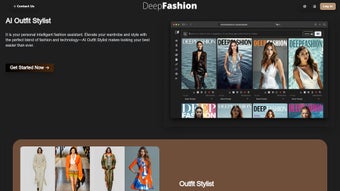

Download DeepFashion AI – AI‑Powered Fashion Design Tool
Introduction: The Future of Fashion Design
The fashion industry has always been a delicate balance between creativity and commerce. Designers spend weeks, sometimes months, sketching concepts, sourcing fabrics, and iterating on prototypes before a single garment ever reaches a runway or a store shelf. In today’s hyper‑competitive market, that timeline can be a critical disadvantage, especially for emerging brands that need to move quickly to capture fleeting trends.
DeepFashion AI enters this landscape as a strategic ally, marrying state‑of‑the‑art deep‑learning algorithms with an intuitive web‑based interface that lets designers focus on storytelling while the software handles the heavy lifting of ideation. By ingesting millions of runway images, historic collections, and fabric textures, the platform builds a visual language that mirrors the decision‑making process of seasoned design houses. This means a designer can simply type “silk midi dress with asymmetric hem and pastel gradient” and receive a set of polished, production‑ready sketches within seconds.
The tool also integrates sustainability metrics, allowing teams to quantify saved prototyping hours and reduced material waste—an increasingly important KPI for brands aiming to meet both consumer expectations and regulatory standards. Whether you’re a solo creator looking for rapid concept generation, a mid‑size label striving for consistent brand voice, or a global fashion conglomerate needing to accelerate seasonal drops, DeepFashion AI offers a flexible subscription model that scales with your ambitions. The following sections dive deeper into the core capabilities, the effortless onboarding process, and the real‑world benefits that set this AI‑driven solution apart from traditional design workflows.
Key Features and How to Get Started
Feature Overview
- AI‑Driven Design Studio: Convert natural‑language prompts into high‑resolution sketches in seconds, with style nuances that reflect your brand’s DNA.
- Brand‑Learning Engine: Continuously analyses past collections to internalise colour palettes, silhouettes, and detailing preferences, ensuring every suggestion feels authentically yours.
- Image Upscaling & Vector Export: Render concepts at up to 8K resolution and export as AI, EPS, SVG, PNG, or JPEG for seamless hand‑off to pattern makers and marketing teams.
- Virtual Dressing Room: Real‑time 3D avatars of varied body types try on AI‑generated garments, providing instant feedback on fit, drape, and visual impact.
- Face Swapping & Model Styling: Preview designs on diverse faces and skin tones, streamlining look‑book creation and inclusive marketing.
- Sustainability Dashboard: Track saved prototype hours, reduced fabric waste, and carbon‑offset metrics directly within the platform.
- Secure Cloud Storage & Collaboration: Encrypted project folders enable team comments, version control, and real‑time approvals.
- Flexible Subscription Tiers: Options for solo designers, small teams, and enterprise organisations, each including commercial rights and priority support.
Installation & Usage Instructions
DeepFashion AI is a cloud‑native SaaS solution, which means there is no traditional download or installation required for most users. The platform runs in any modern browser (Chrome, Edge, Safari, Firefox) on Windows, macOS, iOS, or Android devices.
- Create Your Account: Visit deepfashion.ai, click “Sign Up,” and choose a subscription tier that matches your workflow. Verify your email to unlock the dashboard.
- Set Up Your Brand Library: Drag‑and‑drop past lookbooks, runway photos, fabric swatches, and technical sketches into the “Brand Library.” The AI automatically tags colours, patterns, and silhouette types, building a visual fingerprint of your brand.
- Define a Design Brief: Use the natural‑language input box to describe the desired garment (e.g., “urban bomber jacket with reflective trims and sustainable denim”). You can also upload a mood board for visual reference.
- Generate Concepts: Click “Create” and watch the AI produce 3‑5 distinct design variations within seconds. Each concept includes a high‑resolution sketch, colour palette, and suggested fabric options.
- Iterate & Refine: Select a concept to adjust parameters such as silhouette length, sleeve style, or fabric weight. The AI regenerates the design instantly, allowing rapid exploration of alternatives.
- Export & Collaborate: Download the final sketch in your preferred format or generate a secure shareable link. Team members can comment directly on the design, approve changes, or request new iterations.
- Virtual Try‑On: Load the design into the Virtual Dressing Room. Choose from a library of 3D avatars representing diverse body shapes and ethnicities to evaluate fit, drape, and visual appeal before any physical sample is produced.
- Leverage the Sustainability Dashboard: Review metrics on saved prototype hours, material waste reduction, and estimated carbon‑offset impact. Use these insights for internal reporting or marketing communications.
For users who require offline access, a lightweight desktop client is available for Windows and macOS. The client syncs with the cloud whenever an internet connection is restored, ensuring you never lose progress. Additionally, an optional native mobile app for iOS and Android offers quick concept generation on‑the‑go, perfect for designers who travel frequently or attend trade shows.
Pros, Cons and Frequently Asked Questions
Pros
- Accelerates concept generation from weeks to minutes, dramatically shortening the design cycle.
- Brand‑specific learning ensures every AI suggestion aligns with your historic aesthetic.
- End‑to‑end workflow tools: upscaling, vector export, virtual try‑on, and collaborative cloud storage.
- Built‑in sustainability dashboard quantifies environmental impact and supports CSR initiatives.
- Secure, encrypted cloud environment with full commercial rights for all generated designs.
- Cross‑platform compatibility – works on Windows, macOS, iOS, Android, and any modern web browser.
- Scalable subscription plans accommodate freelancers, small teams, and enterprise‑level operations.
Cons
- Subscription cost may be prohibitive for solo designers without a steady revenue stream.
- Full functionality depends on a stable internet connection; offline mode is limited to basic sketching.
- AI occasionally produces avant‑garde silhouettes that require manual refinement to meet production standards.
- Learning curve for designers unfamiliar with AI‑driven workflows, especially when configuring brand‑learning parameters.
- Advanced features such as the Virtual Dressing Room consume more bandwidth, which may affect performance on slower connections.
FAQ
Is my data safe when I upload brand assets?
Yes. DeepFashion AI uses AES‑256 encryption for data at rest and TLS 1.3 for data in transit. All uploaded files are stored in isolated containers, and you retain full ownership and commercial rights to any designs created.
Can I export designs for production?
Absolutely. Designs can be exported as high‑resolution PNG, JPEG, or vector formats (AI, EPS, SVG) compatible with industry pattern‑making software like Gerber or Lectra.
What subscription plans are available?
There are three core tiers: Solo (USD 49 / month), Team (USD 149 / month for up to 5 users), and Enterprise (custom pricing, unlimited users, priority support, and on‑premise options). All plans include commercial rights and regular AI model updates.
Do I need a powerful computer to run DeepFashion AI?
No. All heavy AI processing happens on DeepFashion’s cloud servers. A modern browser and a stable internet connection are sufficient, even on low‑end laptops.
Is there a free trial or demo available?
Yes. New users can start a 14‑day free trial with full feature access. No credit card is required, and you can cancel anytime before the trial ends.
Conclusion – Transform Your Design Process Today
DeepFashion AI bridges the gap between artistic intuition and cutting‑edge technology, delivering a platform that not only speeds up early‑stage design but also safeguards brand integrity and environmental responsibility. By automating concept generation, providing instant virtual try‑ons, and offering actionable sustainability metrics, the tool empowers creators to allocate more time to refinement, storytelling, and market strategy. Whether you are a freelance designer seeking rapid drafts or a multinational fashion house looking to accelerate seasonal rollouts, the flexible subscription model, robust feature set, and secure cloud environment make DeepFashion AI a compelling addition to any modern design toolkit. Ready to experience AI‑driven creativity? Start your free trial now and watch your next collection come to life in minutes, not months.
Pros: rapid ideation, brand‑specific learning, sustainability dashboard, secure cloud storage, cross‑platform compatibility.
Cons: subscription cost for solo users, internet dependency, occasional avant‑garde outputs that need manual tweaking.



.png)



